Field
Sun Cycle
The next sunrise or sunset, whichever comes first. A dial shows the daylight that has passed today and the time of last light.
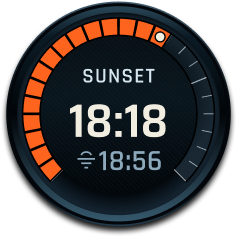
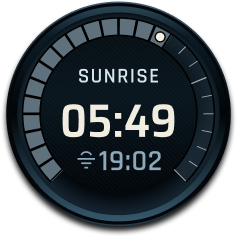
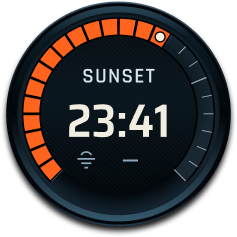
What it shows
- By day, the value is the next sunset. At night, it is the next sunrise.
- The dial caption names the event:
SUNSETby day,SUNRISEat night. Without data it showsSUN. - Rows add
+1Dwhen the event is on the next calendar date. The dial does not. LSTis last light: the end of civil twilight, when the sun is 6° below the horizon.
Sun Cycle uses the same location as Sunrise and Sunset. See Location.
Every form of this field, by zone
| Where | Forms, widest first (the watch shows the first one that fits) |
|---|---|
| Analog · Upper Detail and Bottom |
|
| Analog · Upper Main |
|
| Digital · Upper Detail and Bottom |
|
| Digital · Upper Main (below the time) |
|
| Both styles · dial, line below the value |
|
States
| State | What you see | When it changes | |
|---|---|---|---|
| Day | SUNSET and its time. The daylight arc fills in your Data Color from sunrise to now. | At sunset. |
| Night | SUNRISE and its time. The arc shows the time since sunset in gray. | At sunrise. |
| Last light | The last light icon and its time in the dial context line. | After last light, the face shows the next one. |
| No last light | LST —. The sun does not go 6° below the horizon on this date. | When the sun goes low enough again. |
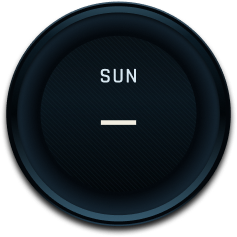 | No location | SUN and —. No arc. | When the watch gets a new location. |
Indicators
- Daylight arc in a dial: three quarters of a circle, from sunrise to now.
- Now marker: an Ivory dot with a black ring.
- Daylight rail below each Digital row, with the now marker.
- The arc hides when the face does not know the sunrise or the sunset.
Touch and hold
Hold the field to open the Garmin sunrise and sunset screen. Back returns you to the face.
Permission
Positioning. The face reads the last known location. It does not start GPS. See Permissions and privacy.
Known limits
- Sun Cycle does not show the age of the location.
LSTshows only in dials and in the Digital Upper Main zone.- In the native watch editor, choose Sunrise for a dial to get Sun Cycle. See Set up and edit.